The Journey Behind Velocity Lapse (Part 2)
In Part 1, I shared the “journey” of creating Velocity Lapse (a time-lapse app for Android), up to the first internal testing release.
Technical setbacks
If I’ve made it seem like development was easy with only a few snags in the previous post, then let me reassure you that it wasn’t.
Why I am sharing technical issues
It would take a while to relate to you all of the technical challenges I encountered. I also don’t want to make this into a series of posts explaining every problem I’ve had during development!
However, I think it’s worth briefly mentioning some of them so that someone can learn and benefit from my mistakes and research.
Resolving a limitation of the official camera package
Since I was using a fork of the official Flutter camera package, the maximum capture resolution was determined by the video capture resolution supported by the device hardware.
It seems that someone else had come across this limitation as well and had created a fork with some patch code. I was able to adapt the code to allow capturing 4K (if supported) and the full camera sensor resolution.
Another encoder issue
As it would be, though, resolving that limitation led to uncovering something else.
When exporting a video with a resolution higher than the supported video capture resolution, the encoder would crash with a null pointer exception.
So, more issues with the encoder, but this time relating to the video encoding resolution.
Thankfully, @sundrycode graciously helped out with his Android development experience.
After we both did a ridiculous amount of online searching, going down multiple rabbit trails and to old and obscure websites on the MediaCodec API, we came to a conclusion that seems logical.
It appears that the device encoding resolution implementation for the MediaCodec API is determined by the supported video capture resolution. Therefore, encoding a 4K video isn’t going to be supported on a device that only supports HD video. For most new but cheap Android phones, the video capture resolution is 1080p HD (1920x1080).
Indeed, it is a hunch, but it seems to be confirmable and logical. If you know for certain, please let me know in the comments below.
First open testing release
Getting to the point where I figured the app was stable enough for open testing (also known as “early access”) took 4 months of work.
In order to submit Velocity Lapse to Google Play for review, I went through the process of writing a description, creating a feature image, and capturing and editing screenshots for the app store page.
I wrote the description, highlighting the main features and the fact that Velocity Lapse captures images rather than capturing straight to video. It wasn’t a great description, but it did the job.
After submitting, I didn’t waste time waiting around for the review to go through. The release was another milestone in my journey, but the app still needed a lot of work before it could really be a great app and something someone would pay for.
Why I won’t use stock images to promote Velocity Lapse
One thing to note is that I’ve committed to only displaying images and screenshots on the listing and website that were actually captured using Velocity Lapse on a mobile device.
What do I mean? Well, I won’t be showcasing Velocity Lapse using stock photography or other images not captured with the Velocity Lapse (unless it is clear that the images are externally captured).
You may be surprised, but sadly, it is not uncommon for even well-known apps—even some mobile camera apps, to use stock photography for the app store listing.
Now, for some apps, I think that it is fine to use stock photography, such as photo editors. There’s nothing to say what camera took the image.
However, for an app where the camera functionality is a big feature (or, —gasp—the main feature!), the best way to showcase the app is by displaying images that it captured. Anything else would seem to be deceptive and/or misleading in my mind.
Although using images that were actually captured with the app can mean that there isn’t as much variety and/or it doesn’t look as good, it does give the viewer an accurate idea of what to expect. Thus, it keeps their expectations in line with reality.
Promotion and my social media strategy
One idea that @sundrycode and a few others suggested was to post time-lapse videos created with Velocity Lapse.
The thought was that perhaps if the videos got popular enough, they would promote the app and inspire others to create their own. They would also serve as real-life examples of what can be created with Velocity Lapse.
So, I created a Youtube channel and began posting time-lapse videos there. I also created an Instagram account, but it sat there unused for a few months, until I got around to making content to post there.
In addition, I did quite a bit of posting on Reddit. Mostly just replying to existing posts, looking for a time-lapse app. Since the OP was asking for time-lapse apps and those viewing the post were likely looking as well, it was a good way to get some first users and help them find something they could use to create time-lapses.
All in all, this was a pretty good strategy, looking back at the successes in both avenues.
User testing and the interface refactoring loop
After yet more user testing and feedback, I began a refactoring of the UI. At first, it primarily centered around the home view.
The most useful method of conducting user testing that I have found is physically watching the test users use the app. I mean practically looking over their shoulder and writing down notes about their interaction.
Getting face-to-face feedback, both positive and negative, and seeing how people use the app in real life crushes some dreamy, false notions you can have as a developer and designer about how the app should work.
Getting this feedback at this point brought up some good ideas for improvements as well as confirmed some ideas that I was personally hesitant to implement (I’ll admit).
It was without doubt a popular request to add a gallery to view exported videos, so I added it to the near future roadmap. I also moved the main call to action buttons to a more thumb-friendly position and polished up various parts of the UI.
Introduction of the bottom nagivation bar
In order to better organize the new features, such as importing a sequence of images as a project, I introduced a bottom navigation bar. It divided Velocity Lapse’s main functions into three understandable categories.
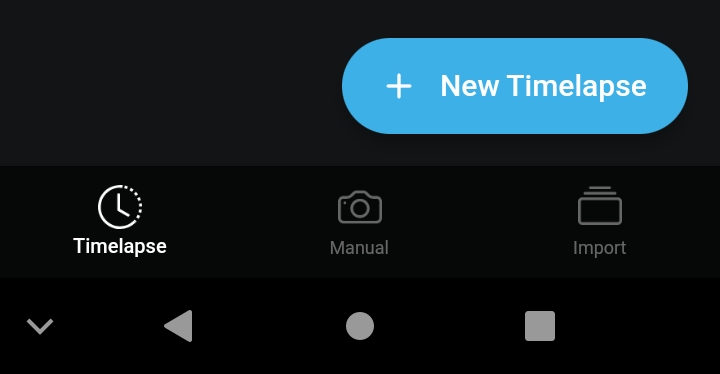
Introducing the bottom tab navigation
The second open testing release
With the new “import images as a project” feature and the UI refactor, I was eager to publish and roll out another release.
Thankfully, by the time I had the release ready a week later, the Google Play app review had gone through, and Velocity Lapse was finally published for public early access.
Third open testing release
The third open testing release included the new tab navigation and the “import images as project” feature.
I now felt like promoting, so I updated the website and replied to a few questions asking for time-lapse app suggestions on Reddit. It turned out to be a good thing as over the next few months, a couple of people found Velocity Lapse through my comment and gave feedback.
Focusing on the things users care about
Listening and acting upon user feedback can be hard. For Velocity Lapse, the feedback was mainly concerning missing features.
I was reminded that tweaking the UI is great, but ultimately most users will accept it the way it is. They will care whether a certain feature is available and works. So, I need to focus on functional features that meet the needs of the user.
It could be very easy to prioritize the things I care about (a clean, sleek interface and well-written code) rather than the things end users actually care about (like feature X or Y). Working on “fun” parts that I enjoy most is great, but if in the end users don’t ever need it, then it is a waste of time.
Adding Manual Capture mode
The capture view with the interval setting and other features was great; however, it didn’t fulfill one required use-case that I had in mind from the beginning: time-lapse captures over extended periods of time. It would also cater to those who would rather not leave their device somewhere while it is capturing.
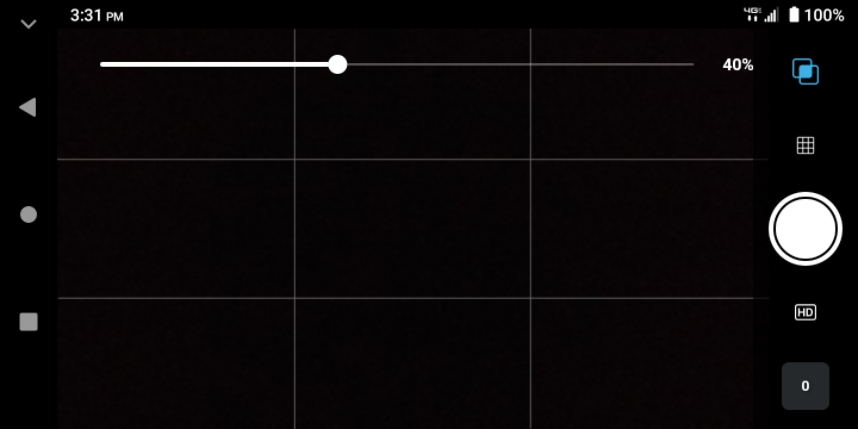
The manual capture view in v0.0.4+6
I named this mode the Manual Capture mode. It includes a camera view with an overlay of the previous image and an indicator telling when the last image was captured.
This was simple enough to implement, but it still took time to differentiate the project UI from the normal Timelapse Capture mode and develop the special interface for it.
First user-submitted feedback
After nine versions into early access, I felt more confident about Velocity Lapse. It had come a long ways since the first version, going from a barely useable app to an app I actually wanted and enjoyed using almost every day.
At this point, I updated the website landing page to better showcase the app and direct visitors to Google Play.
Not long after, I received the first externally submitted feedback on Velocity Lapse. It included a crash report and a few suggestions on how to make the import images as projects feature more user-friendly.
Monitizing the app
If I was creating a free app, the main work would be complete. However, because this is an app with IAPs (in-app purchases), it required the steps to integrate with Google Play billing. This turned out to be one of the more challenging parts of creating Velocity Lapse thus far.
The question of app monitization
There was one thing I was not confident about, and that was what features to have as in-app purchases for the PRO version.
I settled upon having the free version limited in the following ways:
FREE VERSION
- Limit of up to 5 projects at one time
- Export up to 1080p video
- Import images as project limited to import of 400 images
PRO VERSION
- Unlock unlimited projects
- Export up to 4K video (if the device supports it)
- Import images as project with unlimited number of images
This way, the free version of the app is limited in a way that all the features are usable, but there is (hopefully) enough of an incentive to upgrade to the PRO version to allow unlimited access.
Keeping the Sabbath Day
Something that I wanted to make sure to do, was block purchasing Velocity Lapse PRO on Saturday in observance of the Sabbath.
I believe in keeping the seventh day Sabbath (Roman Saturday) as described in the Bible. The Sabbath is a set-apart day of rest and so no buying, selling, or trading is to be done on it (as I understand it).
I’ll state here that I am not a part of any denomination (SDA or otherwise).
My motivation for keeping the Sabbath holy is to do as Yahweh, our Heavenly Father Himself, and our Savior did: rest on the seventh day.
“And on the seventh day Yahweh ended his work which he had made; and he rested on the seventh day from all his work which he had made. And Yahweh blessed the seventh day, and sanctified it: because that in it he had rested from all his work which Yahweh created and made.” -Genesis 2:2-3
“If thou turn away thy foot from the sabbath, from doing thy pleasure on My holy day; and call the sabbath a delight, the holy of Yahweh, honourable; and shalt honour him, not doing thine own ways, nor finding thine own pleasure, nor speaking thine own words: Then shalt thou delight thyself in Yahweh; and I will cause thee to ride upon the high places of the earth, and feed thee with the heritage of Jacob thy father: for the mouth of Yahweh hath spoken it.” -Isaiah 58:13-14
There are many more verses in the Bible regarding the importance of keeping the seventh-day Sabbath.
For some Django-based websites I worked on in the past, I had created and used a Django app called Keep Sabbath which would redirect visitors or show a banner stating that the e-commerce site was closed for the Sabbath.
I did something similar for Velocity Lapse, so that a screen would come up letting them know that they wouldn’t be able to purchase until the next day.
The saying, “A day of rest, a Sabbath request: please refrain from purchasing between sundown Friday and sundown Saturday.” was inspired by someone else’s banner I had seen.
Technical implementation of IAP
Creating the PRO upgrade screen UI itself was one of the screens I most enjoyed implementing (for whatever reason).
However, implementing the IAP integration itself proved to be a lengthy process.
I decided to use RevenueCat to manage purchase validation, etc. rather than writing and maintaining my own web API to do so.
Setting up a Google cloud service account and connecting it to RevenueCat to access the Play Store API on my behalf was a lengthy, but necessary process.
Unfortunately, not everything in the documentation for a Flutter RevenueCat integration was as clear as I thought it should be.
The main culprit of the problems was Dart null safety. Many articles online didn’t handle null safety, and the snippets in the RevenueCat documentation only went so far. For that reason, I may write a post in the future on how to implement RevenueCat with Flutter and Dart null safety.
Thankfully, I was familiar enough with Dart to figure it out. In the end, I had a single in-app purchase for users to upgrade to Velocity Lapse PRO for $3.99 USD.
Updating the Google Play listing (again)
Now that we had a pretty solid version of Velocity Lapse, I went and captured updated screenshots of major screens of the app and created phone screenshots for the Google Play listing.
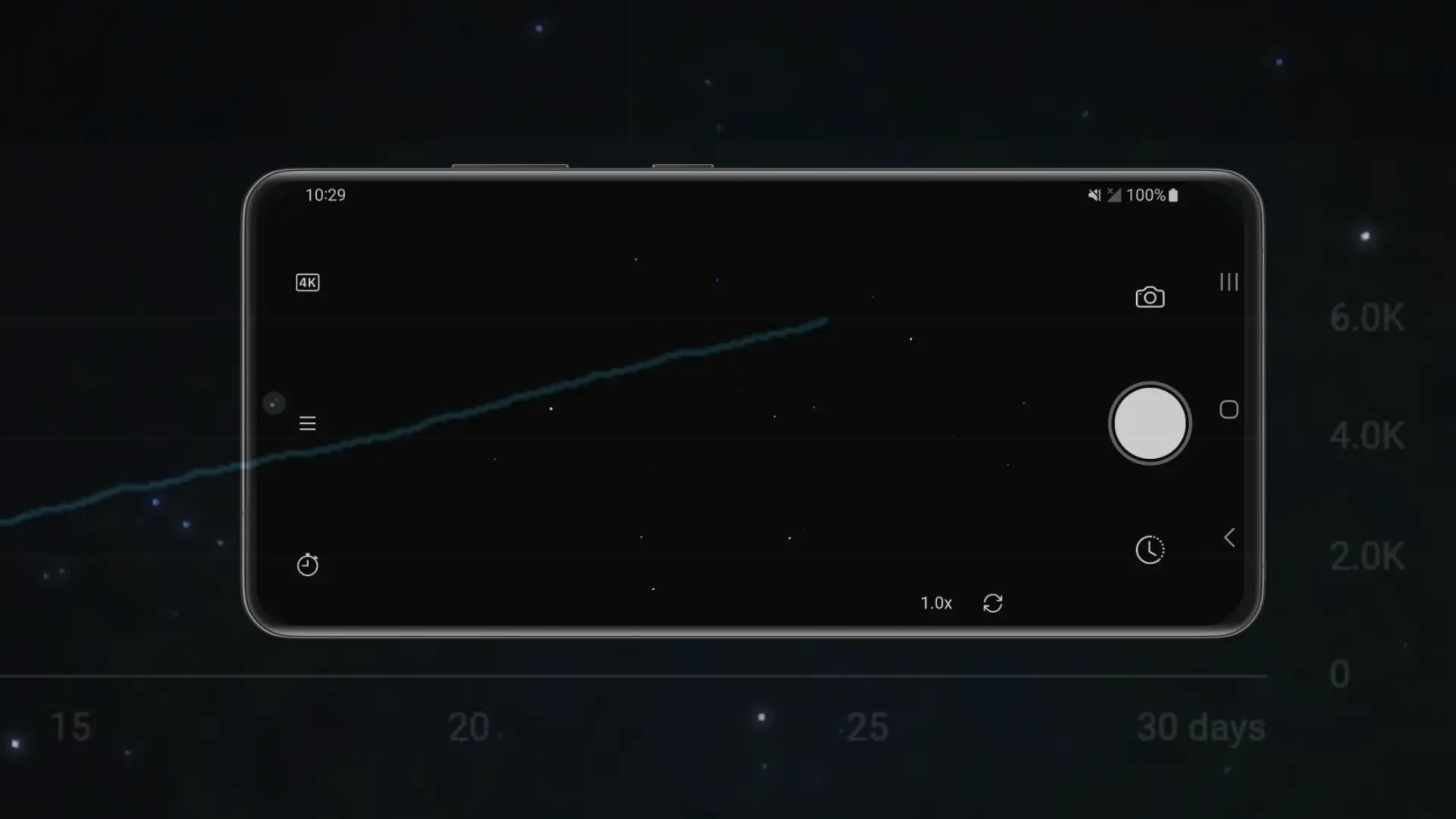
This time, I used a different style with a faded image behind the phone and screenshot mockup as well as a horizontal screenshot to better showcase the two capture modes.
For the months prior, I had been posting some of the time-lapse videos I had captured to the official Velocity Lapse YouTube channel. I added one of the videos as the “feature video” for Google Play. In my opinion, just adding the video made the listing look a lot better than before.
Posting on Reddit
I submitted a Reddit post to gather feedback regarding Velocity Lapse. The post received 700+ views in the first week. It caused a surge of downloads, and I did receive some helpful feedback (albeit not on Reddit itself).
Big features, big holdups
The next tasks on the roadmap were to get 4K export and manual camera controls implemented.
4K video export
4K export to video wasn’t a huge feature to implement. However, since I didn’t have an Android device that supported 4K, testing was tricky. I ended up getting an hour to test on a friend’s phone which I hoped was enough to have caught any issues.
If not… I was sure users would let me know.
EDIT: they did.
Manual camera controls
I spent two weeks working through the Android Camera2 API to implement manual camera controls, ISO, shutter speed, and focus distance (manual focus).
The woes of the Android Camera2 API
Needless to say, working with the Android Camera2 API was not easy.
Something that worked on one device didn’t on another, which lends to the reason it is notorious for fragmented support and overall a bad experience for developers. So much so that some app developers give up on it. Which, makes me feel uneasy and sort of mad.
The first time I tried to capture a night time-lapse of the stars, it didn’t turn out as I expected. I had been working on implementing shutter speed and ISO controls that would allow for nighttime captures.
I set the device out to capture, and it seemed perfect in the camera preview. However, when I came back and looked at the captured images afterwards, I realized that images were being captured as if auto exposure was still on.
Finally, after two weeks of researching and testing to get manual camera controls implemented correctly, I finally got the code to a point where it worked.
I tried capturing a starry night time-lapse once again. I pointed the device upwards, set the shutter speed to 1 sec and the ISO to 6400, then left it to time-lapse for ~2 hours. The result was satisfying for a first successful attempt.
I was happy to post the video on YouTube since it was the first night time-lapse that had turned out fairly nicely.
Some encouragement via positive feedback
Thankfully, it was now working, and more users and positive feedback came as a result of my posts on Reddit, which was encouraging. Nicely timed it was, as one person suggested that I add manual camera controls!
Turning the landing page into a website
I finally took some time aside to create a decent design for the website that would showcase the app features and the time-lapses that I had captured with it. My main thought with it was to inspire people to get out and create their own time-lapses.
At this point, there were around 97 total app downloads and 40 active installs.
An opportunity to learn about photography
Essentially, in the process of creating Velocity Lapse’s camera features, I’m working towards a camera app with extra-nice time-lapse functionality. I find that kind of interesting.
What’s nice about working on this kind of project that deals with the camera is that it has enabled me (maybe ‘given me a good excuse’ is a better wording) to spend time learning about manual camera controls in depth, professional photography and, of course, time-lapse photography.
Had I chosen to work on a project like a file manager, I wouldn’t have probably ever taken the time to dive into photography as I have now. Needless to say, I don’t regret my decision (quite the opposite).
An opportunity to enjoy creation
During the process of creating and testing Velocity Lapse, I have had the opportunity to spend more time enjoying creation. Especially, the sky.
Whether it’s wispy clouds or a pink and blue sunset, creating a time-lapse app has given me a good excuse to pay attention to it.
I’ve really enjoyed it and maybe through creating this app, maybe I can compel and give more people an “excuse” to get out and enjoy it too.
So, I encourage you to download the app and go outside to capture a time-lapse yourself. :)
My video gets popular on YouTube
Speaking of enjoying creation, it seemed that people enjoyed the starscape time-lapse on the Velocity Lapse YouTube channel. The video received 1K views and 11 likes in the first week, 4.7K views and 46 likes in the first 3 weeks, and has 6K views and 56 likes as of this writing.
Later update: The video now has over 83K views, which is kind of crazy (to me) for a 30-second video.
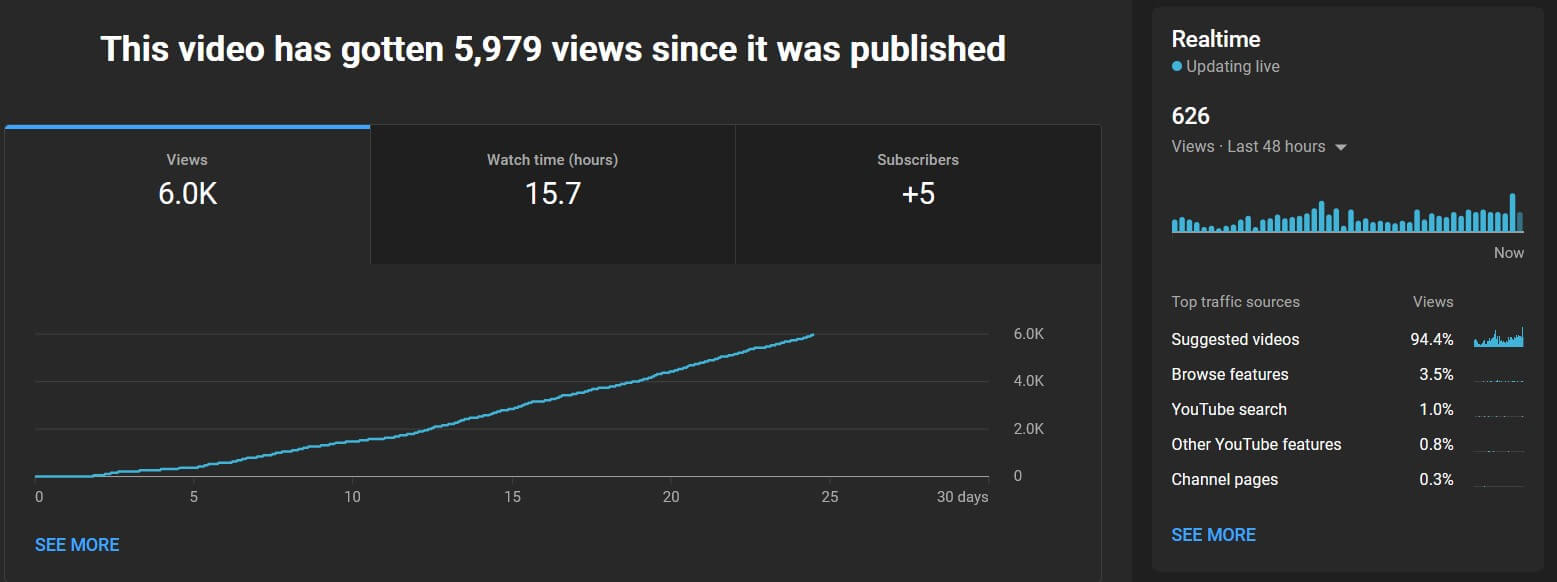
A glance at the stats for the starry night sky time-lapse video on Youtube as of 10/26/22
Needless to say, this was way, far better than any other video I posted.
Granted, it was a short video, but it was interesting and new to me, especially since other videos on the Velocity Lapse channel had fewer than 100 views (as of this writing).
The downloads on Google Play tripled, and some feedback and support queries came my way during this time. I assume this was due to the video receiving so much attention.
Oddly enough, this happened while I was away on vacation. Go figure.
The journey continues
Thanks for reading. I hope you’ve enjoyed this post and have gained something from this journey so far. I know I have.
If you have a suggestion, a comment, or advice, relating either to the app or this post, I’d love to hear what you have to share either in the comments below or via email.
Read the next part of the journey in part 3 of this series.
A big thanks to numerous individuals for their support and advice, making this journey possible. Special thanks to @sundrycode for which I am grateful for his help developing the Android native side of the app and taking part in testing. And Yahweh, our Heavenly Father, from whom all knowledge and every good thing comes.